Caption editor
A professional video caption editor that works word by word
By the Samsaam team · Updated
AI gets most of the way; the editor is where captions become yours. Samsaam’s browser-based caption editor lets you fix words, re-break lines, adjust timing down to the frame and decide which words get the emphasis — then restyle everything with a template.
Inside the editor
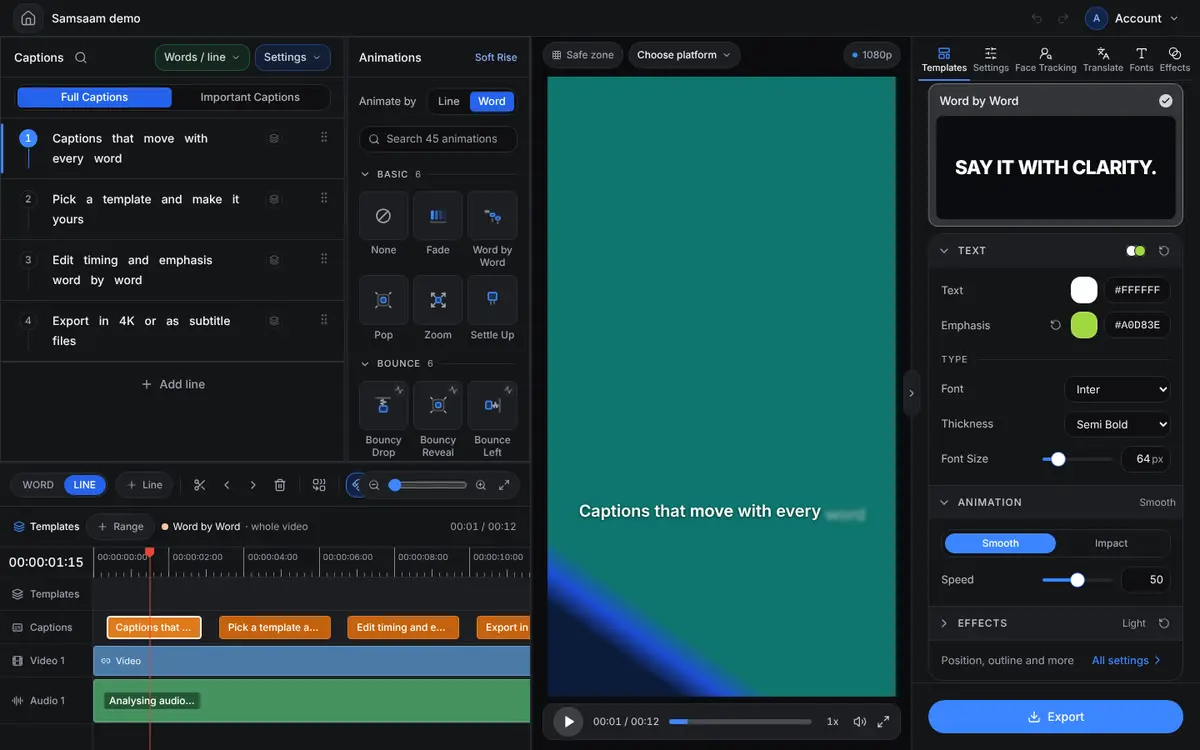
Edit the words
Edit any word
Double-click a caption to correct it. Names, brands and slang take seconds.
Search & replace
Fix a recurring mistake everywhere at once.
Split and re-break lines
Split a caption at any word, or move a word to the previous or next line so captions break at natural pauses.
Delete words
Remove filler words or false starts from the captions.
Control the timing
- Every word has its own timestamp from transcription.
- Drag a caption’s start or end on the timeline; zoom from the whole video down to frame level.
- Nudge a caption with a millisecond delay when it needs to land a beat later.
- Undo and redo any change.
Decide what stands out
Right-click a word to Emphasize it (the main word, maximum impact) or Spotlight it (a secondary highlight). Templates turn that choice into colour, weight, scale or motion — the hand-picked emphasis that makes animated captions read like an editor made them.
For a key-points-only version, switch to important captions; full captions stay untouched.
Style, position and export
- Apply any of 30+ templates, then change font (including your own uploads), colours, size and stroke.
- Position captions anywhere in the frame — clear of platform buttons.
- Add entrance and exit animation per caption, per word or per letter.
- Export SRT, VTT, ASS, TXT or DOCX, or render the captioned video.
Frequently asked questions
Do I need to install anything?
No. The caption editor runs in your web browser.
Can I edit captions I generated in another language?
Yes. Editing works the same in all 90+ languages, including right-to-left scripts such as Urdu and Arabic.
Caption your next video with Samsaam
Animated captions in minutes, starting on the free plan.