Animated captions
Animated captions, timed to every word
By the Samsaam team · Updated
Animated captions are on-screen captions that move with the speech instead of sitting still: words appear as they are spoken, and key words are emphasised with motion, colour or scale.
Animated captions move with the speaker: words pop, rise, slide or blur into place the moment they are said, and key words get colour or scale. Samsaam builds that motion automatically from word-level timing, so you choose a style instead of keyframing one.
The goal is smooth, professional motion: presets inspired by the caption styles creators build by hand in After Effects, eased and timed so they read as hand-animated rather than generic.
There are 30+ ready-made templates and 40+ entrance and exit animations you can apply per line, per word or per letter.
What “animated captions” means in Samsaam
Word-level timing
Each word has its own timestamp, so animation can reveal words exactly as they are spoken rather than a whole line at once.
Entrance and exit motion
Pop, Bounce, Soft Rise, Blur In, Letter Rush, Slide Up Words, Punch Settle and more — chosen per caption.
Emphasis
Templates highlight key words with colour, weight, scale or a marker sweep, the way hand-built creator captions do.
Consistent preview and export
What you see in the editor preview is what the renderer burns into the final video.
Emphasis and effects, word by word
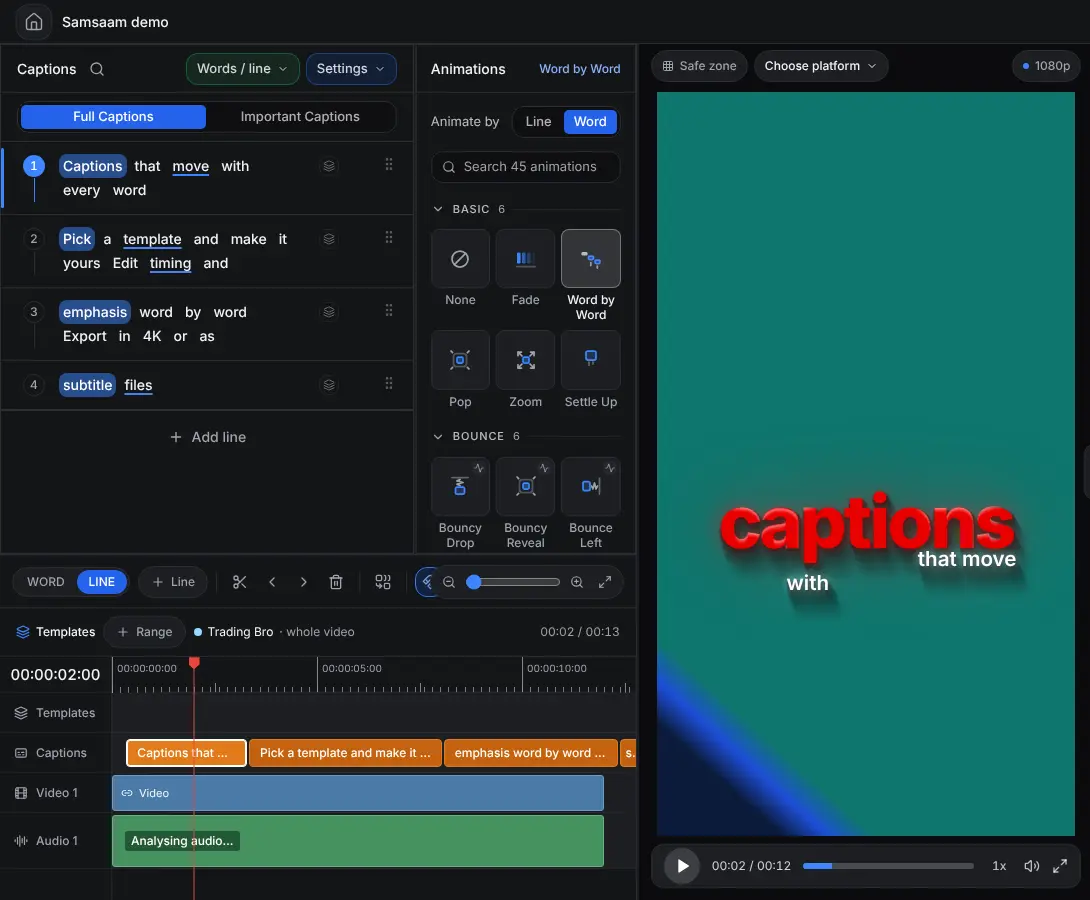
Popular animated caption styles
| Style | What it does | Good for |
|---|---|---|
| Word by word | Reveals one word at a time on speech | Fast-paced Shorts and Reels |
| Stacked emphasis | Two or three lines, one key word enlarged | Talking-head and educational clips |
| Boxed / highlight | Words sit on a moving colour block | Hooks and list videos |
| Kinetic headline | Big condensed type with punchy motion | Openers and ad creatives |
| Minimal fade | Clean line with subtle fade | Interviews, podcasts, brand videos |
Every style can be adjusted: font (including your own uploaded fonts), colours, position, size, stroke and animation.
How to make animated captions
- Upload your video and choose the spoken language.
- Let Samsaam write word-timed captions, then fix any words in the editor.
- Pick a preset from the template library — or a creator look such as Devin Jatho-style captions.
- Fine-tune the motion: change the entrance and exit animation per line, word or letter, and choose which words are emphasised.
- Export the video with captions burned in, or an overlay for your editor.
What makes animated captions look professional?
Smooth motion comes from timing and easing, not from more effects. Words should arrive on the syllable they are spoken, accelerate in and settle gently rather than snap, and only one or two words per line should be emphasised. Samsaam’s presets are built on those rules — the same ones motion designers follow when they hand-animate captions in After Effects — so the result reads as polished rather than busy.
Animated captions vs building them in After Effects
In a motion-design tool, each caption line is a text layer with keyframes you set by hand. That is flexible and slow — a one-minute clip can take hours. Samsaam generates the same kind of result from the transcript in minutes and keeps it editable. The full comparison is on After Effects-style captions without After Effects.
Frequently asked questions
Can I animate only the important words?
Yes. Templates emphasise key words automatically, and important captions goes further: it shows only the key statements, each with a stronger animation.
Do animated captions work in languages other than English?
Yes — the animation is driven by word timing, not by the language, so it works across the 90+ supported languages, including right-to-left scripts like Urdu and Arabic.
Can I export animated captions to use in another editor?
On the Team plan you can export the animated captions as an alpha-channel overlay; Creator and Team can export on a green screen. Subtitle files (SRT/VTT) carry the text and timing but not the animation — that is a limit of the formats.
Caption your next video with Samsaam
Animated captions in minutes, starting on the free plan.