Creator-style captions
Creator-style captions: the looks top YouTubers use
By the Samsaam team · Updated
Creator-style captions are caption looks that became recognisable on the channels of well-known creators — big bold caps with a highlighted word, clean cards that fill in as you speak, stacked two-line hooks. Samsaam has presets inspired by several of these looks, so you can use the style without building it frame by frame.
Samsaam is not affiliated with or endorsed by any creator named on this page. The names describe widely recognised styles; every preset is Samsaam’s own design.
Popular creator caption styles and the matching presets
| Style | What defines it | Samsaam preset |
|---|---|---|
| Alex Hormozi-style | Bold, condensed capitals; the key word in a bright colour; short bursts of words | Simple and Green Pop |
| Ali Abdaal-style | Dark type on a clean white card; the line fills in as it is spoken | Ink Card |
| Devin Jatho-style | A short white line over a heavier coloured line, lit through its centre | Devin Jatho — details |
| Editing School-style | One word at a time on a sharp colour block | Focus |
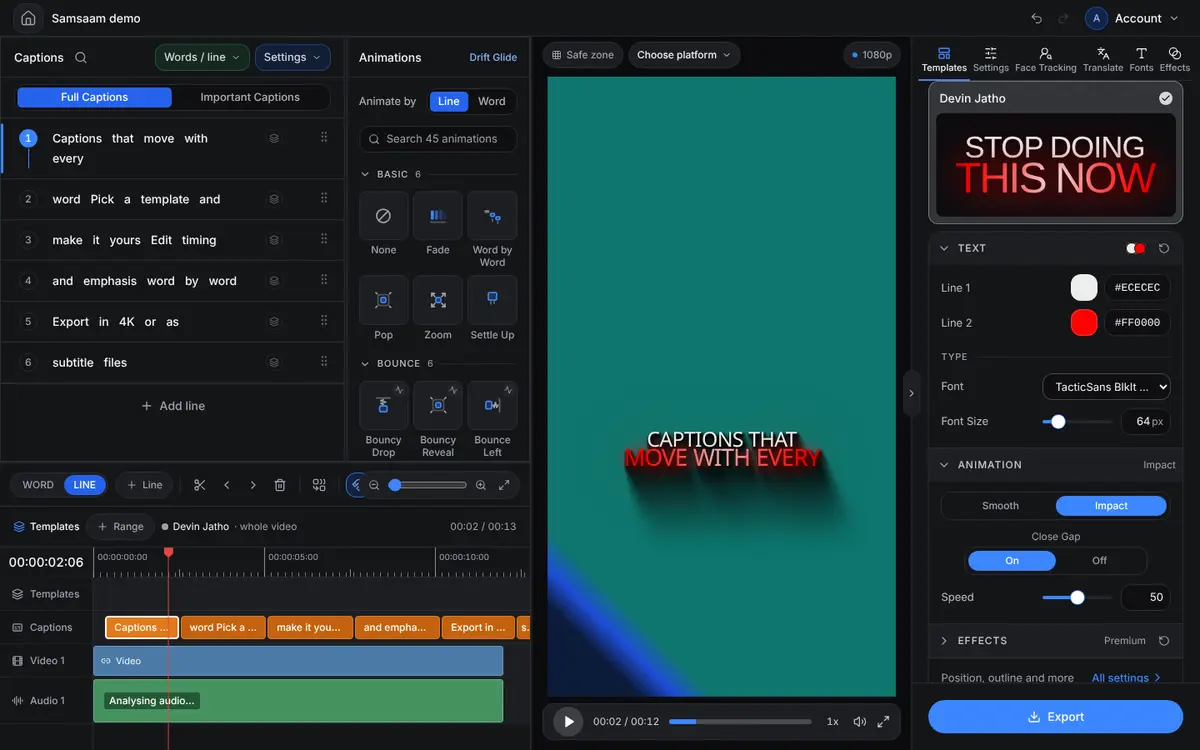
Every preset can be adjusted — colours, your own uploaded fonts, size, position and animation — so you can start from a creator look and make it your own.
How to choose a creator style for your channel
- Fast, high-energy talking head: bold caps with one highlighted word per burst.
- Calm, educational videos: a clean card or minimal line that does not compete with the speaker.
- Hooks and openers: two-line stacked styles that put the key phrase large.
- List and tip videos: one word at a time on a colour block keeps each point punchy.
Whatever you choose, use one style across a series so your videos are recognisable in the feed. Browse every preset with real preview clips in the template library.
How to make captions like your favourite creator
- Upload your video and pick the spoken language.
- Choose the matching preset from the table above.
- Swap in your brand colour or font so the look is yours, not a copy.
- Check timing and emphasis word by word, then export.
Frequently asked questions
Are these the official templates of those creators?
No. Samsaam is not affiliated with any creator named here. The presets are Samsaam’s own designs, inspired by caption styles that are widely recognised.
Do you have a MrBeast-style caption preset?
Not one named for that look. Bold, high-energy styles such as Viral and Attention are a good starting point, and you can change colours and fonts to taste.
Caption your next video with Samsaam
Animated captions in minutes, starting on the free plan.